> For the complete documentation index, see [llms.txt](https://docs.sortment.com/llms.txt). Markdown versions of documentation pages are available by appending `.md` to page URLs; this page is available as [Markdown](https://docs.sortment.com/using-sortment-ai/intelligence-blocks.md).
# Intelligence blocks
## Overview
Intelligence blocks are the AI's long-term memory for your workspace. They are how you give Sortment AI the context it needs to work accurately - your business definitions, your data structure, your brand guidelines, and anything else the AI should know before it builds something for you.
Every time the AI assistant takes an action - building an audience, writing a template, creating a journey, surfacing a recommendation, it reads all intelligence blocks first.
***
### Why Intelligence Blocks Matter
Sortment AI knows your schema. It can see your tables, your columns, and how they relate to each other. But it does not know your business unless you tell it.
Without intelligence blocks, the AI is working without context. It does not know what "lapsed" means at your company, what tone your brand uses, which channel you prefer for different use cases, or what a successful conversion looks like for your goals. The outputs it produces will be technically valid but not tailored to you.
With well-maintained intelligence blocks, the AI produces outputs you can use immediately; audiences that match your actual definitions, templates that sound like your brand, journeys that reflect your real use cases.
> The quality of every AI output is directly proportional to the quality of your intelligence blocks and the information provided in the prompt. This is one of the most important setup step to derive more meaningful output by the AI.
***
### How to Create an Intelligence Block
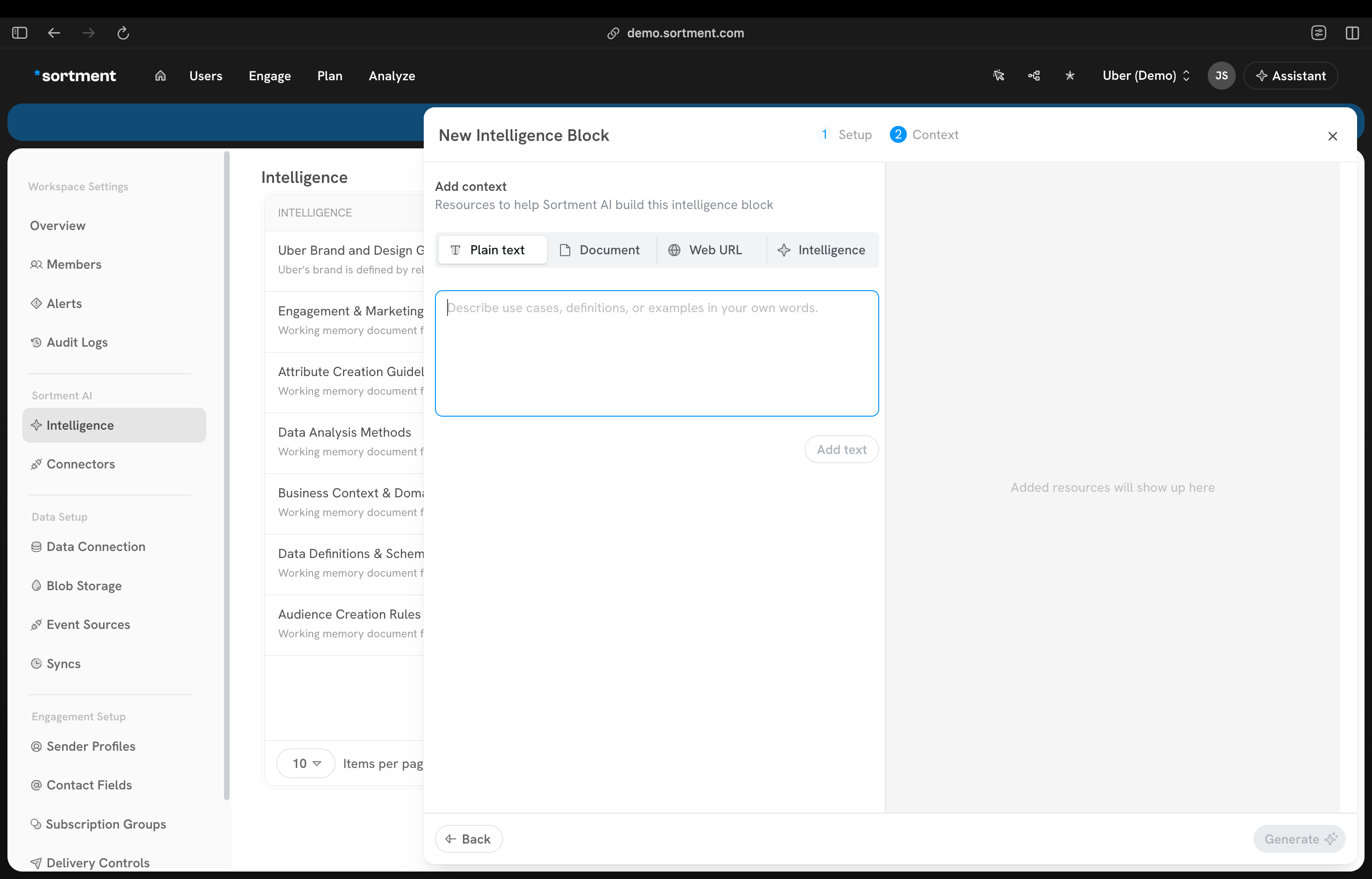
1. Go to **Workspace settings → Intelligence**
2. Click **New block**
3. Provide the purpose for this intelligence block like "defining and business KPIs"
4. Select the categories ("Business Context", "Data Definitions", "Data Analysis", "Attribute Creation","Engagement Strategy","Audience Creation","Business Context")
5. Add the content - either type it directly or attach a file (PDF, document)
6. Click **Save**
The AI will reference this block whenever the context is required for all future actions in the workspace.
There is no limit on the number of blocks you can create.
***
### The Three Blocks we suggest to Create First
**Business Context**
Tell the AI what your company does, what your marketing goals are, how you define your key user segments, and what success looks like.
**What to include:**
* What your product or service does
* Your primary marketing goals (e.g. increase ride frequency, reduce churn, activate new users)
* Definitions for key business terms the AI will encounter (e.g. "A lapsed user is someone who has not taken a ride in 14 days", "A high-value user takes more than 8 rides per month")
* Key user segments you care about
***
**Data Context**
Tell the AI about your warehouse structure the table names, key column names, what the important values mean, and any data quirks your team knows about.
**What to include:**
* Names of your key tables and what they contain
* How tables relate to each other in plain language
* Any data quality notes (e.g. "The `homecity` column is null for users who signed up before 2022")
You can directly get a list of SQLs and their purposes on a txt or a pdf and directly share it with the AI in the intelligence blocks and let the AI derive all this information by itself
> This block helps AI to understand the tables and their purpose. The more precisely you describe your data, the more accurate the queries the AI writes.
***
**Content and Design Guidelines**
Tell the AI how your brand communicates so that templates and campaign copy it generates match your style.
**What to include:**
* Brand tone (e.g. "Friendly and direct. Not formal.")
* How to address users (e.g. "Always use first name")
* Your Email Structure, theme and skeleton
* CTA style (e.g. "Action-oriented: 'Book now', 'Get back on the road'. Avoid 'Click here'.")
* Channel-specific rules (e.g. "WhatsApp messages should be short and conversational. Email can be longer.")
* Anything to avoid (e.g. "Never use exclamation marks in subject lines")
{% hint style="info" %}
If you do not have any existing content and want to start with something, you can always go to the community templates on Sortment and select any that you like from thousands of available template. Ask the AI to make changes on that template as you desire and then let Sortment AI extract the content and design guidelines from the created templates.
{% endhint %}
***
### Building Blocks Over Time
You do not have to create everything at once. Intelligence blocks can be built incrementally as you work with the AI.
**Memory extraction:** As you have conversations with the AI assistant, it identifies things you say that should be saved - business definitions, preferences, corrections. It surfaces these as suggestions and asks if you want to save them as a new block. Confirm to save, decline to discard.
**Saving mid-conversation:** You can ask the AI directly at any point - "Save that as an intelligence block" or "Remember that for future use" and it will create the block from the current conversation context.
***
### What Happens if You Skip Intelligence Blocks
The AI will still work. But it will produce generic outputs that may require manual editing before they are usable.
Common symptoms of missing or thin intelligence blocks:
* AI builds audiences using different definitions than your team uses (e.g. defines "lapsed" as 30 days when your business uses 14)
* AI generates templates that do not match your brand tone
* AI asks clarifying questions about things your data context block should already cover
* AI-generated SQL references wrong column names or uses incorrect values
If AI outputs are consistently off, the first thing to check is whether the relevant intelligence block exists and whether it is specific enough.
***
### Managing Intelligence Blocks
* **Edit** a block at any time by clicking on it and updating the content
* **Delete** a block if it is outdated or no longer relevant; the AI will stop referencing it immediately
* Review blocks periodically, especially after your data structure changes or your brand guidelines are updated